

Embedding of WebRTC broadcast and playback using the HLS technology
Here we show a simple HTML code to embed an HLS player to your website.
In order to embed a WebRTC streamer, follow the recommendations of this article. A video stream is sent using the publishStream method as described in Web SDK.
Preparing to embedding the HLS player for iOS Safari
To perform HLS playback in the iOS Safari browser you need to prepare all necessary scripts and files:
- Install Web Call Server to your hosting.
- If you experience difficulties while installing the server, you can run the already configured turnkey virtual Web Call Server in the Amazon cloud
- Besides you can connect to our demo servers
- wss://wcs5-eu.flashphoner.com:8443
- wss://wcs5-us.flashphoner.com:8443
- Download the latest build with HTML and JavaScript code
- Unpack the build on your web server and open the following files
- examples/demo/hls-player/hls-player.html
- examples/demo/hls-player/hls-player.js
These files do not require any changes and are simple the required code minimum that allows HLS playback in the iOS Safari browser using HTML5 and Websocket technologies. Let’s take a look at these files.
HLS player code
hls-player.html
The main part of the HLS player code is the ‘video’ element. A browser displays it as a conventional player with all the buttons: ‘Play’, ‘Stop’ etc. as long as the ‘controls’ attribute is set.

hls-player.js
In this script we assign the ‘src’ attribute to the video player placed on the page using the ‘video’ tag. This attribute tells the player where it should fetch the video stream to play from. We do this dynamically to be able to play various streams addressed by their names.
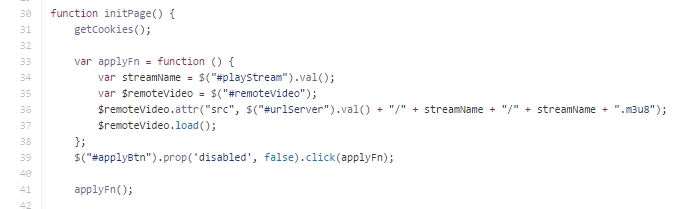
We use m3u8 as the extension part. Here is an example of the ‘src’ attribute and the player code:
src=”http://wcs5-us.flashphoner.com:8082/stream1/stream1.m3u8”
The entire code looks as follows:
width=”320″
height=”240″
controls=”controls”
type=”application/vnd.apple.mpegurl”
src=”http://wcs5-us.flashphoner.com:8082/stream1/stream1.m3u8”
/>
Therefore you can embed this minimalistic cod to your web page and end up with an HLS player capable of playing a video stream sent from another browser via WebRTC or RTMP.
Demo examples are thoroughly described in the Testing section.
This page is out of date
Please visit the actual page describing integration of an HLS player into your HTML-code
Download Web Call Server 5
System requirements: Linux x86_64, 1 core CPU, 2 Gb RAM, Java
Installation:
- wget https://flashphoner.com/download-wcs5.2-server.tar.gz
- Unpack and install using 'install.sh'
- Launch server using command 'service webcallserver start'
- Open the web interface https://host:8444 and activate your license
If you are using Amazon EC2, you don't need to download anything.
